Skip to content

add MCP server badge - #2

Merged
wayzeek merged 1 commit into
mcpdotdirect:mainfrom
punkpeye:glama-badge
May 23, 2025
Merged

add MCP server badge#2
wayzeek merged 1 commit into
mcpdotdirect:mainfrom
punkpeye:glama-badge

Conversation

@punkpeye

@punkpeye punkpeye commented Apr 19, 2025

Copy link
Copy Markdown
Contributor

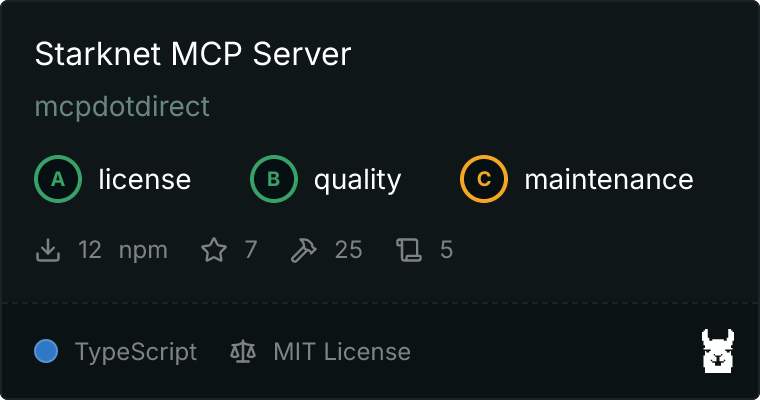
This PR adds a badge for the Starknet MCP Server server listing in Glama MCP server directory.

Starknet Server MCP server

Glama performs regular codebase and documentation checks to:

  • Confirm that the MCP server is working as expected
  • Confirm that there are no obvious security issues with dependencies of the server
  • Extract server characteristics such as tools, resources, prompts, and required parameters.

This badge helps your users to quickly assess that the MCP server is safe, server capabilities, and instructions for installing the server.

Summary by CodeRabbit

  • Documentation
    • Added a clickable badge image linking to the MCP server page on glama.ai near the top of the README.
    • Minor formatting update in the license section.

@punkpeye

Copy link
Copy Markdown
Contributor Author

are you on the MCP Discord?

Let me know your Discord username and I will give you a special flair that's only for MCP server authors.

@coderabbitai

coderabbitai Bot commented Apr 19, 2025

Copy link
Copy Markdown

Walkthrough

A clickable badge image was added near the top of the README file, positioned after the introductory description. This badge links to the MCP server page on glama.ai, is sized at 380x200 pixels, and visually identifies the Starknet MCP server. No other content was modified in the README except for the removal of a trailing newline in the license section.

Changes

File(s) Change Summary
README.md Added a clickable badge image linking to the MCP server page on glama.ai; removed trailing newline in license section.

Poem

A shiny badge upon the page,
Click it—glama.ai’s the stage!
Starknet’s server now in view,
With pixels bright and purpose true.
README’s spruced, the news is out—
The MCP’s what it’s all about!
🐇✨

Tip

⚡💬 Agentic Chat (Pro Plan, General Availability)
  • We're introducing multi-step agentic chat in review comments and issue comments, within and outside of PR's. This feature enhances review and issue discussions with the CodeRabbit agentic chat by enabling advanced interactions, including the ability to create pull requests directly from comments and add commits to existing pull requests.

Thanks for using CodeRabbit! It's free for OSS, and your support helps us grow. If you like it, consider giving us a shout-out.

❤️ Share
🪧 Tips

Chat

There are 3 ways to chat with CodeRabbit:

  • Review comments: Directly reply to a review comment made by CodeRabbit. Example:
    • I pushed a fix in commit <commit_id>, please review it.
    • Generate unit testing code for this file.
    • Open a follow-up GitHub issue for this discussion.
  • Files and specific lines of code (under the "Files changed" tab): Tag @coderabbitai in a new review comment at the desired location with your query. Examples:
    • @coderabbitai generate unit testing code for this file.
    • @coderabbitai modularize this function.
  • PR comments: Tag @coderabbitai in a new PR comment to ask questions about the PR branch. For the best results, please provide a very specific query, as very limited context is provided in this mode. Examples:
    • @coderabbitai gather interesting stats about this repository and render them as a table. Additionally, render a pie chart showing the language distribution in the codebase.
    • @coderabbitai read src/utils.ts and generate unit testing code.
    • @coderabbitai read the files in the src/scheduler package and generate a class diagram using mermaid and a README in the markdown format.
    • @coderabbitai help me debug CodeRabbit configuration file.

Note: Be mindful of the bot's finite context window. It's strongly recommended to break down tasks such as reading entire modules into smaller chunks. For a focused discussion, use review comments to chat about specific files and their changes, instead of using the PR comments.

CodeRabbit Commands (Invoked using PR comments)

  • @coderabbitai pause to pause the reviews on a PR.
  • @coderabbitai resume to resume the paused reviews.
  • @coderabbitai review to trigger an incremental review. This is useful when automatic reviews are disabled for the repository.
  • @coderabbitai full review to do a full review from scratch and review all the files again.
  • @coderabbitai summary to regenerate the summary of the PR.
  • @coderabbitai generate docstrings to generate docstrings for this PR.
  • @coderabbitai resolve resolve all the CodeRabbit review comments.
  • @coderabbitai configuration to show the current CodeRabbit configuration for the repository.
  • @coderabbitai help to get help.

Other keywords and placeholders

  • Add @coderabbitai ignore anywhere in the PR description to prevent this PR from being reviewed.
  • Add @coderabbitai summary to generate the high-level summary at a specific location in the PR description.
  • Add @coderabbitai anywhere in the PR title to generate the title automatically.

CodeRabbit Configuration File (.coderabbit.yaml)

  • You can programmatically configure CodeRabbit by adding a .coderabbit.yaml file to the root of your repository.
  • Please see the configuration documentation for more information.
  • If your editor has YAML language server enabled, you can add the path at the top of this file to enable auto-completion and validation: # yaml-language-server: $schema=https://coderabbit.ai/integrations/schema.v2.json

Documentation and Community

  • Visit our Documentation for detailed information on how to use CodeRabbit.
  • Join our Discord Community to get help, request features, and share feedback.
  • Follow us on X/Twitter for updates and announcements.

@coderabbitai coderabbitai Bot left a comment

Copy link
Copy Markdown

Choose a reason for hiding this comment

The reason will be displayed to describe this comment to others. Learn more.

Actionable comments posted: 0

🧹 Nitpick comments (2)
README.md (2)

10-12: Align badge markup style, alt text, and verify URL
The new badge is inserted via raw HTML while existing badges use Markdown syntax. For consistency and readability, consider using Markdown link syntax:

- <a href="https://glama.ai/mcp/servers/@mcpdotdirect/starknet-mcp-server">
-   <img width="380" height="200" src="https://glama.ai/mcp/servers/@mcpdotdirect/starknet-mcp-server/badge" alt="Starknet Server MCP server" />
- </a>
+ [![Starknet MCP Server on Glama](https://glama.ai/mcp/servers/@mcpdotdirect/starknet-mcp-server/badge)](https://glama.ai/mcp/servers/@mcpdotdirect/starknet-mcp-server)
Also verify that the badge URL resolves correctly, and adjust the alt text to "Starknet MCP Server" for clarity. You may add a title attribute for improved accessibility if desired.


550-550: Ensure newline at end-of-file
The trailing newline appears to have been removed after the license section. It's best practice to end text files with a single newline for POSIX compatibility and to satisfy linters.

📜 Review details

Configuration used: CodeRabbit UI
Review profile: CHILL
Plan: Pro

📥 Commits

Reviewing files that changed from the base of the PR and between 92ca871 and 141dddd.

📒 Files selected for processing (1)
  • README.md (2 hunks)

@wayzeek
wayzeek merged commit cea723d into mcpdotdirect:main May 23, 2025
Sign up for free to join this conversation on GitHub. Already have an account? Sign in to comment

Labels

None yet

Projects

None yet

Development

Successfully merging this pull request may close these issues.

2 participants